
WordPress community events
Let your community add the events
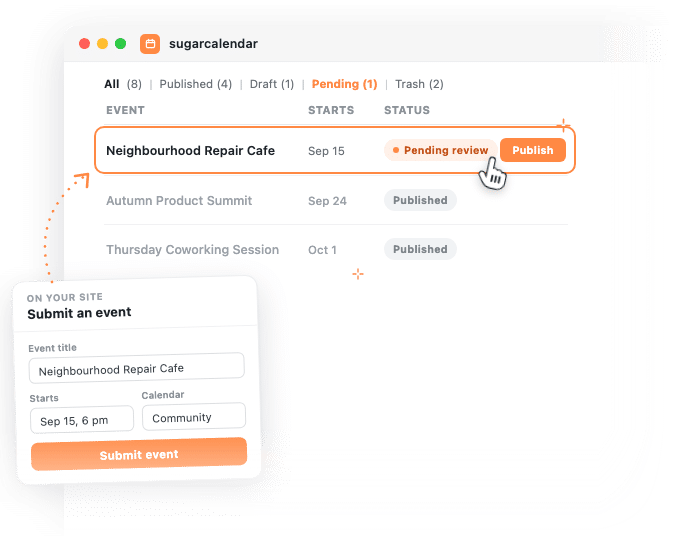
Visitors fill in a form on your site, the event lands in your calendar as pending review, and nothing shows in public until you approve it.


How it works
What you get with community events
Your form builder collects the details. Sugar Calendar turns them into a real event and holds it until you say yes.
Nothing appears until you approve it
Set the form to Pending Review and every submission waits in your events list, out of public view, until you publish it.
Nobody needs a login
The form is an ordinary page on your site, so you are not handing out WordPress accounts to keep a calendar current.
Your form builder does the asking
Build the form in WPForms and map each answer to an event field in its Event Submissions panel. Formidable Forms and Gravity Forms are supported too.
It files itself on the right calendar
Point the Calendar setting at a dropdown and Sugar Calendar fills that dropdown with your own calendars. Submissions arrive already sorted.
Venue, speakers and tags can come along
The same panel maps a venue, speakers, tags and an event link, so a submission can arrive complete instead of half filled in.
Every event shows where it came from
The event editor keeps a link back to the submission it arrived on, so you can open the original wherever your form builder stores its entries.
Why it helps
Why run community events in Sugar Calendar
Your calendar stays yours
A public form does not mean a public calendar. Submissions queue as pending review, so nothing reaches your visitors that you have not read first.
One less inbox to work through
Members email you a date, a place and a description, and somebody retypes all three. The form puts those answers straight into the fields an event already has.
The form builder you already run
There is no second form editor to learn. Your event settings sit inside the builder you use for everything else, next to the notifications and confirmations you have already set up.
You decide what to ask for
Ask for a title and a date and fill in the rest yourself, or map everything the event has, venue and speakers and tags and an event link, and let a submission arrive ready to read.
Reviews
What our users say about us

 WordPress
-
 Sugar Calendar is now my go-to calendar due to its simplicity with adding new events. I’ve found that it was so much easier for my clients to use than some of the other event/calendar plugins out there while providing the features they needed most.
 -
Sugar calendar is an overall great plugin that’s easy to use, looks clean and was so easy to implement. Im so used to programs having a steep learning curve before I can truly use the program to its fullest potential, this is not the case for Sugar Calendar!
-
Sugar Calendar does all that I need. I have never had a problem with it, and support has been responsive when I had questions. It’s easy to install, simple to configure. It looks great on my WordPress theme.
-
Sugar Calendar is intuitive, and very user friendly. I love that the learning curve to use the calendar is so low. Even my non-tech clients can get their heads around it.
-
Sugar Calendar is a selective and useful approach for time management and scheduling. It gives the exact appointment to the right person, and all the reminders are well set.
-
Overall I’ve found sugar calendar to be a robust plugin that’s well maintained and offers everything you would need for a Wordpress plugin like this. It’s extremely user friendly and the simplicity of creating events, adding details, and more make this an amazing plugin.
-
This is an incredibly solid plugin to use as a base. I’ve tried several others, and this one is better than all the others I’ve tried!
-
Huge fan! Love the simple nature of this plugin. Perfect for a site that just needs a basic calendar with none of the bloat that comes along with The Events Calendar.
-
I was just looking for a simple calendar to display a short events list inside a sidebar and a calendar on a single page. This plugin accomplishes this exactly as expected and, unlike the other many calendar plugins, this one provides two blocks which include the events list and also the calendar.
Explore other powerful features
Everything you need for seamless event management.

Event organization
Sort events into calendars and tags so visitors can filter down to the ones they care about.

Event speakers
Give the people running a session a profile, and reuse it on every event they appear at.

Event venues
Keep each address once and attach it to every event held there.
Frequently asked questions
Do visitors need a WordPress account to submit an event?
No. The form sits on an ordinary page, so anyone who can see the page can fill it in. You keep the only account that can publish what they send.
Can I review community events before they appear?
Yes. Set Event Status to Pending Review and each submission waits in your events list, where your visitors cannot see it, until you publish it yourself.
Which form builders can I use for community events?
WPForms, Formidable Forms and Gravity Forms. Sugar Calendar detects the builder you have active and adds its event settings there. In WPForms the panel is called Event Submissions.
Which plans include community events?
Frontend event submissions are part of Sugar Calendar Events Pro and are included on every paid plan, so your plan covers the event side. The fields a visitor fills in come from your form builder, so what the form can ask for depends on which builder and edition you run. Tiers are on the pricing page.
Can a submitted event repeat?
The panel maps a Repeat and an End Repeat field, so your form can ask for a repeating schedule instead of a single date.
Can visitors attach a photo to their event?
The panel maps a featured image to a file upload field, so it depends on your form builder offering one. Check its field list before you promise visitors a photo.
What happens to a submission I do not approve?
Nothing publishes. It stays in your events list, invisible to visitors, for as long as you leave it there, and you can trash it whenever you like.