This tutorial covers how to use every Sugar Calendar Events shortcode and the attributes each one accepts.
In This Article
Before you get started, make sure Sugar Calendar Events is installed and activated on your site.
Available Shortcodes
| Shortcode | What it shows | |||||||||||||||||||||||||||||||||||||||||||||||||
|---|---|---|---|---|---|---|---|---|---|---|---|---|---|---|---|---|---|---|---|---|---|---|---|---|---|---|---|---|---|---|---|---|---|---|---|---|---|---|---|---|---|---|---|---|---|---|---|---|---|---|
| A calendar with month, week, and day views | |||||||||||||||||||||||||||||||||||||||||||||||||
| A list of upcoming events | |||||||||||||||||||||||||||||||||||||||||||||||||
| The ticket purchase receipt | |||||||||||||||||||||||||||||||||||||||||||||||||
| The details for a single ticket | |||||||||||||||||||||||||||||||||||||||||||||||||
| The legacy calendar and events list |
The calendar and events list shortcodes show the same output as the Sugar Calendar blocks, and they accept the same settings as attributes.
Adding a Shortcode
Paste the shortcode into a Shortcode block, a Classic editor, a text widget, or your page builder’s shortcode element. To build a shortcode without typing it, use the Shortcode Generator in the Classic editor.
To add attributes, put each one after the shortcode name with its value in quotes:
[sugarcalendar_events_list display="grid" maximum_events_to_show="6" group_events_by_week="false"]
Keep these rules in mind:
- Attribute names use underscores, such as
featured_only. The camelCase names from the block, such asfeaturedOnly, don’t work in a shortcode. - Yes or no attributes take
trueorfalse. - ID attributes take one ID or several IDs separated by commas, such as
calendars="3,7". - Sugar Calendar Events ignores attributes it doesn’t recognize, including misspelled names and values that aren’t on the list of options. The shortcode then uses the default without showing an error.
To show a shortcode in a PHP template, pass it to do_shortcode():
echo do_shortcode( '[sugarcalendar_events_calendar display="week"]' );
Finding Calendar, Tag, Venue, and Speaker IDs
The filter attributes take IDs, not names. To find an ID, go to the screen below and hover over the item’s name.
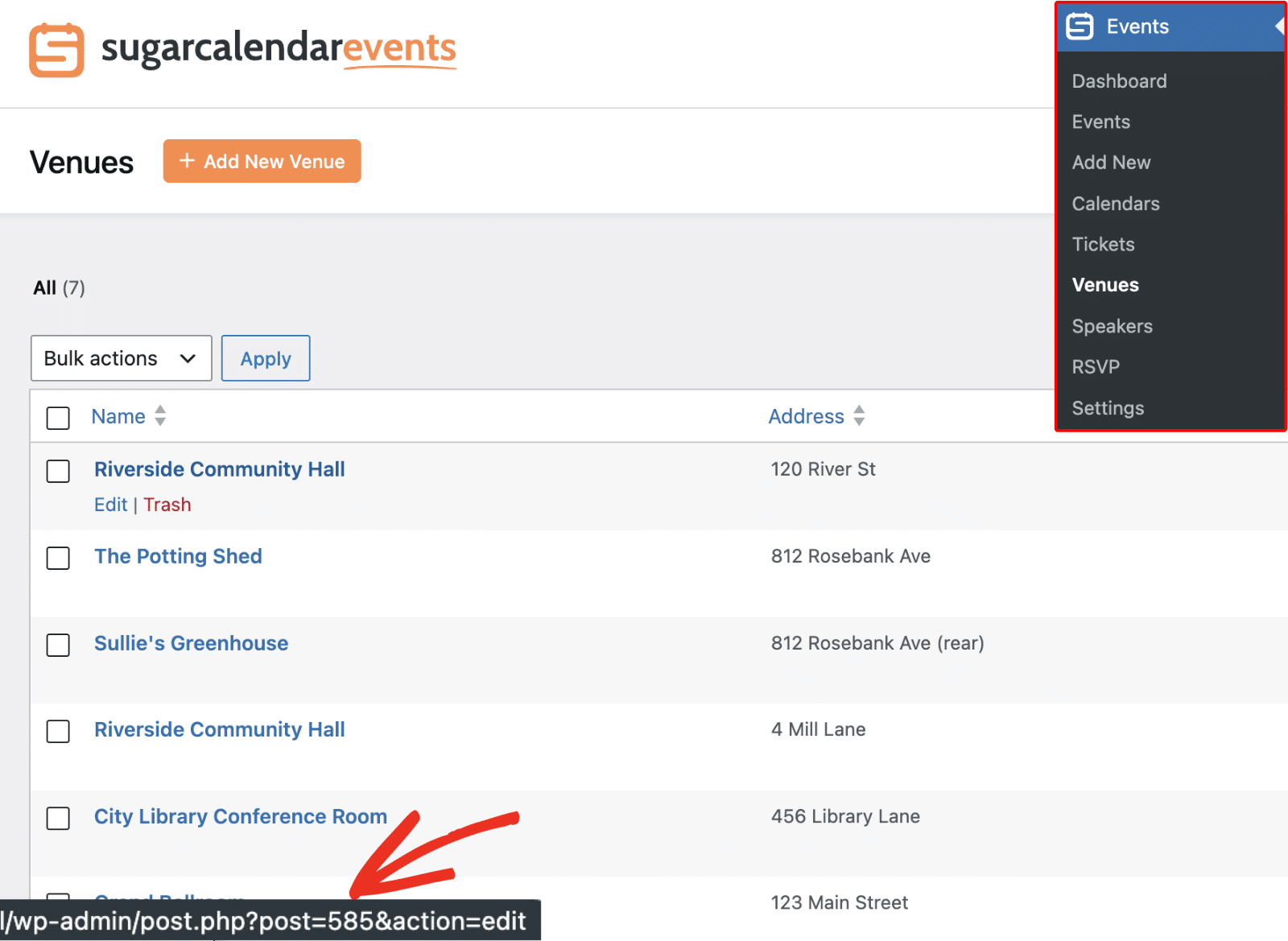
The ID is the number at the end of the link that appears at the bottom of your browser.
| Item | Where to find it | The ID in the link |
|---|---|---|
| Calendar | Events » Calendars | calendar_id=3 |
| Tag | Events » Tags | tag_id=7 |
| Venue | Events » Venues | post=410 |
| Speaker | Events » Speakers | post=526 |
Note: Venues and speakers need Sugar Calendar Events Pro.
Events Calendar Shortcode
The
shortcode shows a calendar of your events. Without attributes, it shows the current month with every event.
Days of the WeekTime of DayMonthWeekDayMonM23TueT24WedW25ThuT26FriF27SatS28SunS29All DayMulti-day12:00 AM1:00 AM2:00 AM3:00 AM4:00 AM5:00 AM6:00 AM7:00 AM8:00 AM9:00 AM10:00 AM11:00 AM12:00 PM1:00 PM2:00 PM3:00 PM4:00 PM5:00 PM6:00 PM7:00 PM8:00 PM9:00 PM10:00 PM11:00 PM
| Attribute | Values | Default | What it does |
|---|---|---|---|
display | month, week, day | month | Sets the view the calendar opens in. |
calendars | Calendar IDs | All calendars | Shows only events from these calendars. |
tags | Tag IDs | All tags | Shows only events with these tags. |
venues | Venue IDs | All venues | Shows only events at these venues. Needs Pro. |
speakers | Speaker IDs | All speakers | Shows only events with these speakers. Needs Pro. |
featured_only | true, false | false | Shows only featured events. |
show_block_header | true, false | true | Shows the header with the date controls, view switcher, filters, and search. |
allow_user_change_display | true, false | true | Lets visitors switch between the month, week, and day views. |
show_filters | true, false | true | Shows the filters button. |
show_search | true, false | true | Shows the search field. |
appearance | light, dark | light | Sets the light or dark color scheme. |
accent_color | A hex color code | #5685BD | Sets the color of buttons and highlights. |
id | Any text | Generated | Sets the HTML id of the calendar, so you can target it with CSS or JavaScript. |
For examples of each attribute, see our guide to displaying the calendar.
Events List Shortcode
The
[sugarcalendar_events_list group_events_by_week="false" maximum_events_to_show="20" events_per_page="5"]
| Attribute | Values | Default | What it does |
|---|---|---|---|
display | list, grid, plain | list | Sets the layout of the list. |
group_events_by_week | true, false | true | Shows the events one week at a time. Set it to false to show the next upcoming events instead. |
maximum_events_to_show | A number | 10 | Sets the total number of events in the list. |
events_per_page | A number | 10 | Sets the number of events on each page of the list. |
calendars | Calendar IDs | All calendars | Shows only events from these calendars. |
tags | Tag IDs | All tags | Shows only events with these tags. |
venues | Venue IDs | All venues | Shows only events at these venues. Needs Pro. |
speakers | Speaker IDs | All speakers | Shows only events with these speakers. Needs Pro. |
featured_only | true, false | false | Shows only featured events. |
show_block_header | true, false | true | Shows the header with the date controls, view switcher, filters, and search. |
allow_user_change_display | true, false | true | Lets visitors switch between the list, grid, and plain layouts. |
show_filters | true, false | true | Shows the filters button. |
show_search | true, false | true | Shows the search field. |
show_date_cards | true, false | true | Shows the date card next to each event. |
show_descriptions | true, false | true | Shows each event’s description. |
show_featured_images | true, false | true | Shows each event’s featured image. |
image_position | right, left | right | Sets the side the featured image appears on. |
appearance | light, dark | light | Sets the light or dark color scheme. |
accent_color | A hex color code | #5685BD | Sets the color of buttons and highlights. |
links_color | A hex color code | #000000D9 | Sets the color of the event titles and links. With appearance="dark", the default is white. |
id | Any text | Generated | Sets the HTML id of the list, so you can target it with CSS or JavaScript. |
Note: The maximum_events_to_show and events_per_page attributes only apply when group_events_by_week is false. If events_per_page is higher than maximum_events_to_show, the list uses the maximum instead.
The events list shortcode doesn’t have a category attribute. To filter by calendar, use calendars with calendar IDs.
For examples of each attribute, see our guides to displaying event lists and displaying upcoming events.
Combining Filters
When you list several IDs in one attribute, the shortcode shows events that match any of them. For example, calendars="3,7" shows events from either calendar.
When you use more than one filter attribute, events have to match all of them. This shortcode shows only featured events from calendar 3 at venue 410:
Days of the WeekTime of DayListGridPlainThere are no events scheduled that match your criteria.
Ticketing Shortcodes
The
| Shortcode | Page |
|---|---|
| The receipt page that buyers see after they pay |
| The page for a single ticket, opened from the receipt |
Sugar Calendar Events creates both pages for you. To choose different pages, go to Events » Settings » Payments and use the Tickets Page Configuration section. If you build your own page, add the matching shortcode to it.
Legacy Shortcodes
The There are no upcoming events to display.November 2026
Monday Tuesday Wednesday Thursday Friday Saturday Sunday
and
Legacy Calendar Attributes
| Attribute | Values | Default | What it does |
|---|---|---|---|
type | month, week, 2week, 4day, day | month | Sets the calendar view. |
size | large, small | large | Sets the calendar size. |
category | A calendar slug | All calendars | Shows only events from this calendar. |
month | 1 to 12 | The current month | Sets the month the calendar opens in. |
year | A year, such as 2027 | The current year | Sets the year the calendar opens in. |
sow | 0 to 6 | The site’s setting | Sets the first day of the week, where 0 is Sunday and 1 is Monday. |
Legacy Events List Attributes
| Attribute | Values | Default | What it does |
|---|---|---|---|
display | upcoming, past, in-progress, all | upcoming | Sets which events the list shows. |
number | A number | 5 | Sets the number of events. |
order | ASC, DESC | ASC, or DESC for past events | Sets the sort order by start date. |
category | Calendar slugs | All calendars | Shows only events from these calendars. Separate several slugs with commas. |
show_date | true | Off | Shows each event’s date. |
show_time | true | Off | Shows each event’s time. |
show_categories | true | Off | Shows each event’s calendars. |
show_link | true | Off | Shows a Read More link to each event. |
Frequently Asked Questions
These are answers to some of the top questions we see regarding using shortcodes on Sugar Calendar Events.
Why does my attribute have no effect?
Check the spelling first. Sugar Calendar Events ignores attribute names and values it doesn’t recognize, so a typo such as show_filter or a block name such as showFilters falls back to the default without an error.
Also check that you’re using the attribute with the right shortcode. For example, category only works with the legacy shortcodes, and show_date_cards only works with the events list.
Can I change the default attributes for every shortcode?
Yes. The sugar_calendar_shortcodes_modern_shortcodes_attributes_sugarcalendar_events_calendar and sugar_calendar_shortcodes_modern_shortcodes_attributes_sugarcalendar_events_list filters let you change the attributes before each shortcode renders. This example makes every events list use the grid layout unless the shortcode sets display:
add_filter(
	'sugar_calendar_shortcodes_modern_shortcodes_attributes_sugarcalendar_events_list',
	function ( $attributes, $shortcode_attributes ) {
		if ( empty( $shortcode_attributes['display'] ) ) {
			$attributes['display'] = 'grid';
		}

		return $attributes;
	},
	10,
	2
);
The $attributes array uses the block’s camelCase names, such as display and featuredOnly. To learn where to add this code, see our tutorial on getting started with Sugar Calendar hooks.
That’s it! You now know how to use every shortcode and attribute in Sugar Calendar Events.
Next, would you like to read event details in your own code? Check out our guide to accessing event data in Sugar Calendar Events.